Artivona
Elevate Guide
Elevate Guide
Couldn't load pickup availability
Self-paced learning overview
- 📁 Digital file available after purchase
- 🗂️ Long-term availability
- 🔐 Secure checkout
- 📝 Content updated in 2026
1. Problem Statement
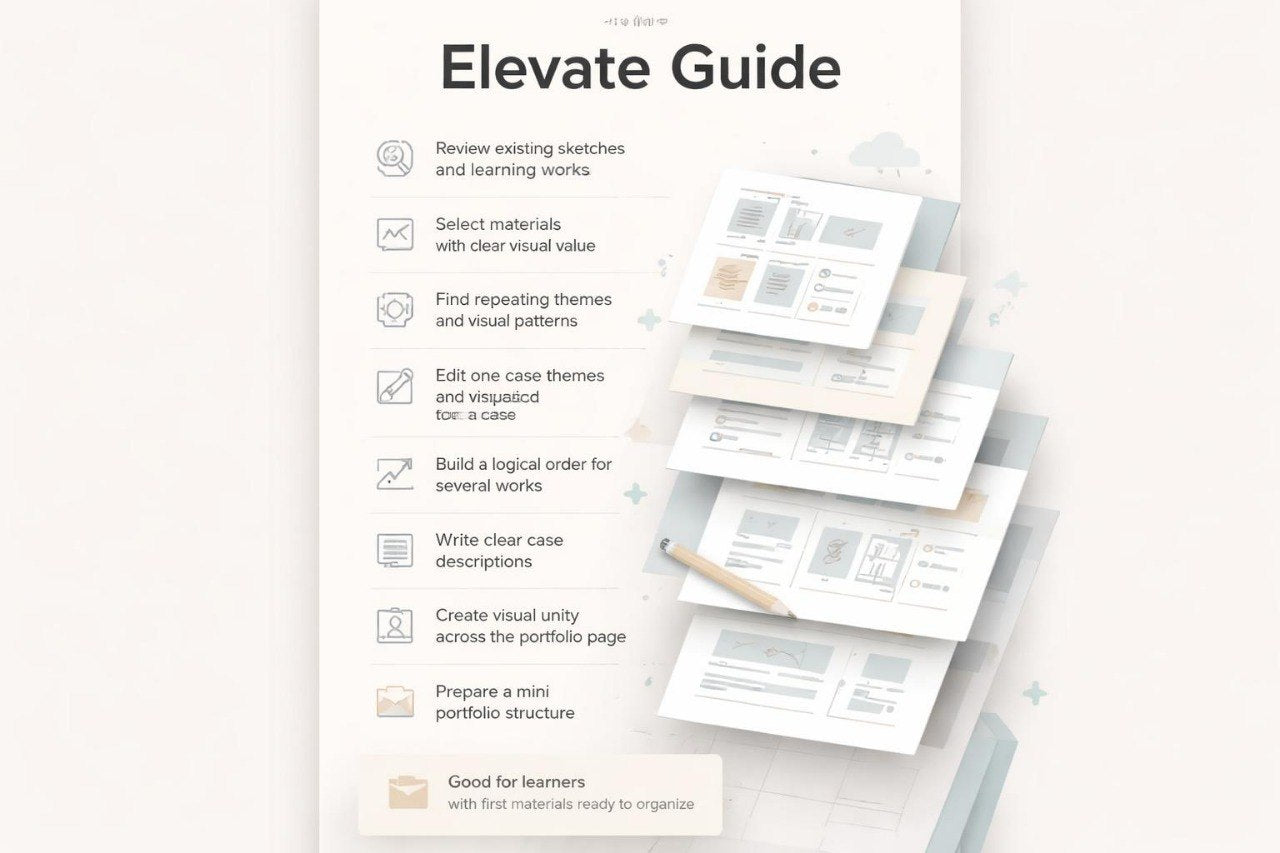
Struggling to understand which works should stay in your portfolio and which ones should be revised or set aside? At this stage, another challenge often appears: you may already have more materials, but they do not yet share one clear logic. Some works may look interesting on their own, but together they may not feel like a cohesive collection. It can also be difficult to write a description for each case, especially when you want to explain the idea without dramatic wording or empty phrases. Elevate Guide is created to help you carefully review existing works, refine their presentation, and prepare a more connected portfolio structure.
2. Solution
This guide will teach you how to work with learning pieces you have already created and see them as material for a future collection. You will review each work through several points: theme, composition, color, type hierarchy, sequence, and explanation. The materials help you avoid simply adding more images and instead choose the works that support your visual direction. In this plan, more attention is given to editing, comparing versions, and arranging cases. This approach helps turn separate learning fragments into a more organized portfolio presentation.
3. What’s Inside
Module 1: Reviewing Existing Works
In the first module, you begin with an inventory of your own materials. These may include sketches, learning exercises, test compositions, image series, type fragments, or first arranged cases. The course suggests not judging them through a harsh “good / bad” lens, but looking more carefully: which work has a theme, where there is an interesting composition choice, which fragment needs simplification, and where explanation is missing. You will create a short review table where each work receives a note: what should stay, what can be clarified, and what may not belong in the current collection. This helps you see your materials not as a chaotic folder, but as a basis for a future structure.
Module 2: Choosing a Portfolio Direction
The second module helps define what story your collection may tell. A portfolio does not need to cover everything at once; often it feels more gathered when it has several repeating motifs. You will explore which themes, colors, forms, or task types appear more often in your works. The materials explain how to notice your own visual tendencies without trying to look artificially universal. As a result, you can define a short direction: for example, editorial graphics, poster series, identity for imagined projects, abstract compositions, or a mixed learning set.
Module 3: Case Editing
In this module, you choose one work and move through the editing process. You check whether the main focus is clear, whether the composition is overloaded, whether the color supports the theme, and whether the text behaves appropriately. The course shows how to make changes not randomly, but through specific questions. For example: what should the viewer see first, which element distracts, whether another version is needed, and whether the description can be shortened. The module teaches you to work with a piece as material that can be refined through careful editing, rather than restarted from zero every time.
Module 4: Presentation Sequence
The fourth module is dedicated to the order of works. Even a strong individual piece can feel lost if placed in an unsuitable position. You will review several ordering methods: from simpler to more complex, by theme, by color rhythm, by task type, or by visual energy. The materials explain how the first work sets the tone, how the middle of the collection holds attention, and how the final fragment gives a sense of closure. As part of the task, you will create two or three sequence options and compare which one works better for your collection.
Module 5: Text Presentation Without Exaggeration
The fifth module helps you write descriptions for your works. You will learn how to define a short task, explain the visual direction, name the main decisions, and describe the process without unnecessary decoration. The materials offer a description structure: context, idea, form, color, composition, and closing note. The tone of writing is reviewed separately: it should be meaningful, but not overly promotional. This matters for Artivona because a portfolio should speak about the work honestly, calmly, and specifically. In the task, you will prepare several descriptions for your works in one consistent style.
Module 6: Visual Unity of the Page
In this module, you work with the layout of a page or presentation collection. The focus is on spacing, block rhythm, image size, the relationship between text and visuals, repeated elements, and overall clarity of presentation. You will see how shared layout principles help different works feel like part of one portfolio. The module does not require all cases to look identical; instead, it shows how to keep variety while giving it a shared frame. In the practical part, you will create a presentation layout for several works.
Module 7: Mini Portfolio Structure
The final module brings the previous steps together. You shape a small portfolio structure: intro text, work order, short descriptions, visual blocks, and notes for future refinement. This does not have to be the final version of the portfolio, but it is already a more organized form than a group of separate files. The materials help you define which works can stay in the current collection, which ones should be clarified, and which can become the basis for future cases. By the end, you will have a clear direction for further arrangement without unnecessary pressure.
4. Who is this for?
✅ Good fit if you:
- already have several learning works or sketches;
- want to understand what can be included in a first collection;
- feel that your works need a shared structure;
- want to learn how to edit cases instead of constantly starting over;
- want to write calm and specific descriptions for your works;
- value gradual review, comparison, and clean presentation;
- want to prepare the basis for a fuller portfolio.
❌ Not for you if you:
- expect claims about employment, clients, or financial results;
- want a completed collection without your own practice;
- are looking for training tied to named software or platforms;
- do not want to review and edit your own materials;
- expect individual corrections for every sketch within this plan;
- are looking for a course built around loud marketing claims.
5. What You’ll Learn
- How to review your learning works without chaotic self-judgment.
- How to decide which materials may become part of a portfolio.
- How to notice repeating themes, forms, and visual motifs.
- How to edit one case through specific questions about composition, color, and text.
- How to build a presentation sequence for your works.
- How to write case descriptions without excessive claims.
- How to arrange several works within one visual frame.
- How to prepare a short portfolio introduction.
- How to create a mini collection structure from several works.
- How to define what should be refined at the next stage.
6. Refund Terms
For Elevate Guide, a 30-day refund request period may apply according to the Artivona store policy. Before placing an order, the buyer should review the refund policy, material format, and course usage terms. This plan does not include claims about work, clients, financial figures, or defined external outcomes. The materials are intended for study, practice, editing, and gradual portfolio arrangement. If the course format does not match expectations, requests are reviewed according to the rules published in the store.
How do refund terms work?
How do refund terms work?
Paid plans may include a 30-day refund request period according to the store policy. For the no-cost plan, a refund does not apply because no payment is made.
Do I need named software or platforms?
Do I need named software or platforms?
No. Artivona materials are not tied to named third-party services, programs, or operating systems. The focus stays on graphic design principles, work structure, idea presentation, and visual thinking.
Does Artivona claim specific career or financial results?
Does Artivona claim specific career or financial results?
No. Artivona courses do not include claims about jobs, clients, financial figures, or instant changes. The materials are intended for study, practice, and shaping a collection of design works.
Share